
 Sierra
Starting February 3, 2026, the My Bookshelf bar in Vega Discover will be upgraded to the My Account Portal. This change will happen automatically and will not require additional opting-in.
If someone asks why this change was made:
The My Account Portal brings all account features into a single interface. Patrons can manage checkouts, holds, reading history, fines, saved searches, and bookmarks from a single location. The core functions of My Bookshelf remain, but they are now organized in the My Account Portal with clearer navigation and additional options.
If someone asks if they can revert back to My Bookshelf:
The My Account Portal interface has been enabled for all Vega Discover online catalog sites and cannot be reverted back. This change brings an easier and more intuitive account management experience.
Account Linking
New: Account linking is a feature of My Account Portal. Starting early March 2026, patrons can easily link multiple library accounts, making it simple for parents, guardians, and caregivers to switch between child and adult profiles. With dedicated 1-way and 2-way permission levels, households and guardians can manage checkouts and holds without juggling multiple logins.
Resources and Training
Visit the Resources pages on the PrairieCat website for documentation and videos on My Account Portal and Account Linking for library staff. Materials that can be utilized within the library and over social media are available on the PrairieCat website under Services | Marketing Materials.
Shortly after the My Account Portal update is released, PrairieCat staff will create and share more informational videos and how-to documents with screenshots to share with staff and patrons. There will also be revised videos in TalentLMS concerning Showcase creation and management to align with these changes after the March update.
If you have any questions about this upcoming change, please contact the PrairieCat Help Desk under the Vega Discovery topic.
My Account Portal Features
- The patron account popup accessed by clicking your patron name now links patrons to the My Account Portal for checkouts, holds, profile and fine links and includes an Account Portal access button as well.
- Note: If you were using account page redirects from your site to send a patron to a particular Bookshelf view upon login these will now direct the user to the expected My Account Portal view.
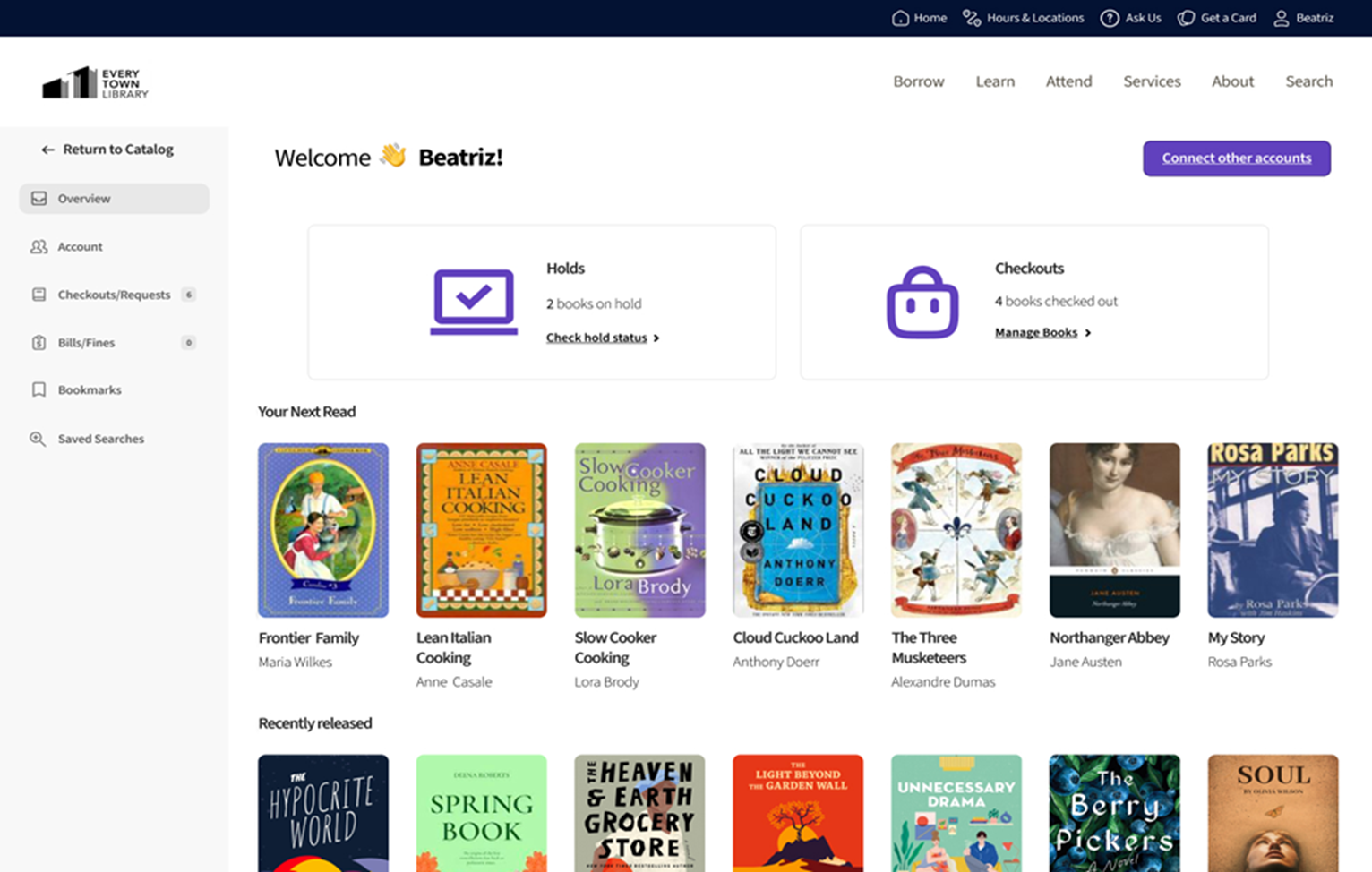
- A new Patron Account Overview Page with a summary of checkouts and holds, suggested titles, and configured library promoted showcases.
- A new Account view for managing your profile settings, that has been enhanced with account preference settings for default catalog site (for consortia libraries) and default search filters that allow patrons to limit searches to their preferred formats, availability, age group, language, etc.
- A new combined view for Checkouts, Requests, and Reading History (if you're opted in) that includes search and sort options.
- A new Bills/Fines view where patrons can access fine payment workflows.
- A new Bookmarks view with precision searching in all list views, a collapsible available bookmarked items view, and summary availability info for each of your saved lists.
- Automated "Your Next Read" Showcase created from user's saved bookmarks and lists.
- A new Saved searches view with searching ability for users with many searches
- Log in to post comments